
Why Most CRO Audits Fail Before They Start
You've read the advice. "Run a CRO audit." "Optimize your funnel." "Fix your checkout flow."
Then you Google "ecommerce CRO audit" and find a 9,000-word guide telling you to spend 3 weeks analyzing heatmaps, conducting user interviews, mining customer reviews, and building prioritization matrices.
You close the tab. Nothing changes. Your conversion rate stays at 1.4%.
Here's the problem: traditional CRO audits were designed for agencies billing $5,000-$15,000 per engagement. They need to justify the cost with complexity. But complexity is the enemy of action.
What if you could get 80% of the value in 30 minutes instead of 3 weeks?
The Before and After: What a CRO Audit Actually Reveals
Before we dive into the framework, look at what happens when you audit a real product page. This is the difference between a store that converts at 1.2% and one that converts at 3.4%:
Before: 5 Conversion Killers Found
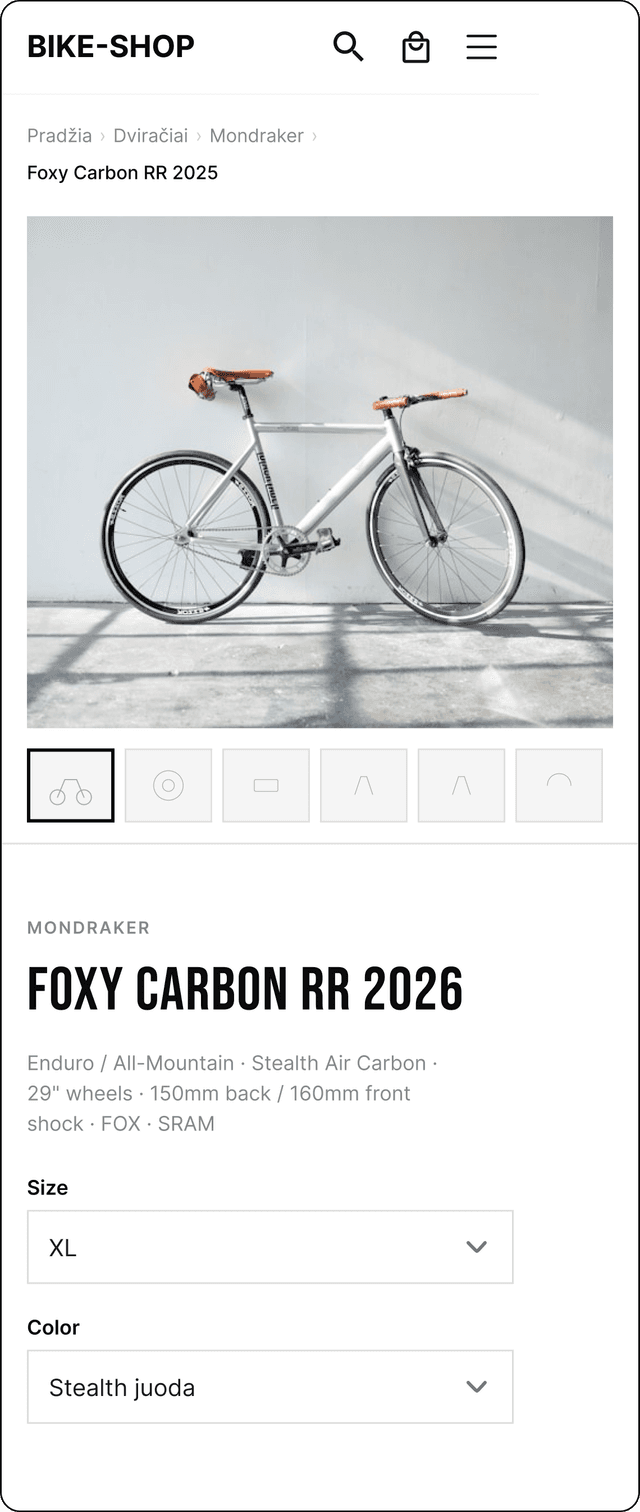
What's wrong:
- Hidden price below the fold
- No add-to-cart on first screen
- Zero trust signals (no reviews, no guarantees)
- Variants buried in a dropdown
- Generic product description (specs only)
After: 5 Fixes Applied
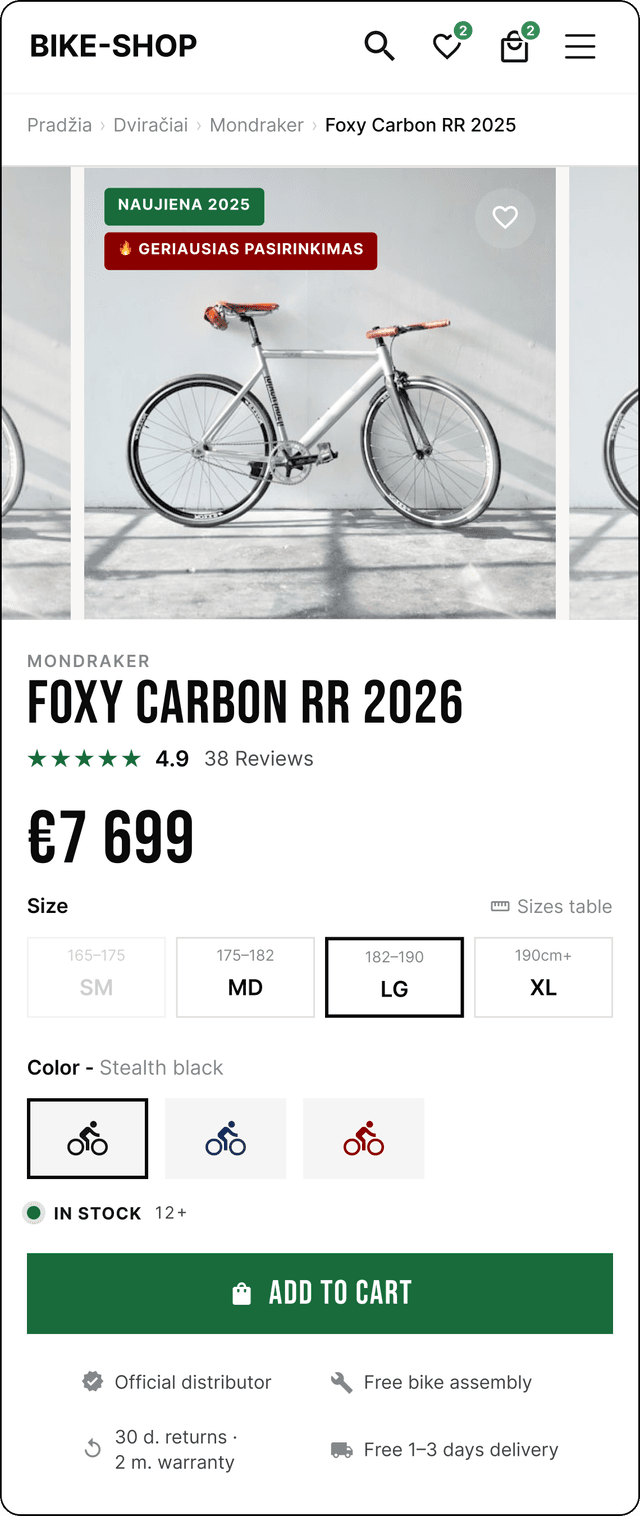
What's fixed:
- Price visible above the fold
- Add to cart CTA above the fold
- Clear reviews overview (social proof)
- Tappable variant swatches
- Clear benefits under the CTA
These aren't theoretical improvements. They're the exact findings that an AI-powered CRO audit surfaces in minutes, not weeks.
The 30-Minute CRO Audit Framework
Here's the framework. Five categories, roughly 6 minutes each. Each one targets a different stage of the buyer journey where conversions leak.
Category 1: Product Pages (Minutes 1-6)
Your product pages are where buying decisions happen. 62% of visitors leave before scrolling — if they can't see the price, CTA, and social proof on the first screen, you've already lost them.
What AI checks that you'd miss manually:
- CTA placement: Is "Add to Cart" visible without scrolling? On mobile? On every product variation?
- Price visibility: Anchored next to the title or buried below the fold?
- Image quality: 5+ images per product? WebP format? Zoom support? Lifestyle shots?
- Social proof: Are reviews visible immediately? Star rating above the fold?
- Urgency signals: Stock indicators, shipping timelines, limited-time offers?
Real finding example: "Add-to-cart button is below the fold on mobile devices. Forces shoppers to scroll twice before they can buy. Mobile users represent 70%+ of your traffic."
Category 2: Checkout Flow (Minutes 7-12)
69.8% of shopping carts are abandoned (Baymard Institute). Most of those abandonments are caused by friction in the checkout, not price objections.
What to check:
- Guest checkout: Does your store force account creation? This adds 23% abandonment.
- Form fields: How many fields? Every extra field drops completion by 4.5%.
- Payment options: Apple Pay, Google Pay, PayPal, BNPL? Missing any = missed sales.
- Progress indicator: Does the user know how many steps remain?
- Error handling: What happens when a credit card is declined? Clear, helpful, or confusing?
The hidden killer: Shipping costs revealed at checkout. Unexpected costs are the #1 reason for cart abandonment globally. Show shipping early or offer free shipping thresholds.
Category 3: Trust Signals (Minutes 13-18)
First-time visitors need 3-5 trust signals before they'll buy from an unknown store. No reviews, no security badge, no shipping promise? That's not a product page — that's a gamble.
Critical trust checkpoints:
- Reviews & ratings: Visible on product pages? Recent? With photos?
- Security indicators: SSL, payment badges, "Secure Checkout" messaging?
- Returns policy: Clearly stated? Easy to find? Reasonable terms?
- Contact information: Phone, email, live chat? All three builds maximum trust.
- About page: Real team photos, origin story, physical address?
The test: Would you buy from your own store if you'd never seen it before? If you hesitate, your customers hesitate 10x more.
Category 4: Mobile UX (Minutes 19-24)
70%+ of eCommerce traffic is mobile. But most stores are designed on desktop and "responsive" is treated as an afterthought.
What actually matters on mobile:
- Tap targets: Buttons at least 44x44px? Links not too close together?
- Text readability: Font size 16px minimum? Adequate contrast?
- Navigation: Hamburger menu works? Search accessible? Filters usable with one thumb?
- Forms: Auto-fill enabled? Correct keyboard types? (numeric for phone/zip)
- Sticky CTA: Add-to-cart button stays visible while scrolling?
Real finding example: "Mobile navigation requires 4 taps to reach checkout. Desktop requires 2. This extra friction costs an estimated 12% of mobile conversions."
Category 5: Page Speed (Minutes 25-30)
Every 1-second delay in page load drops conversions by 7%. A store loading in 5 seconds instead of 2 is losing 21% of potential buyers before they even see a product.
Speed checkpoints:
- Largest Contentful Paint (LCP): Under 2.5 seconds? Google's Core Web Vital threshold.
- Cumulative Layout Shift (CLS): Under 0.1? Elements jumping around kills trust.
- Total page weight: Under 3MB? Every MB above that adds loading time on mobile.
- Third-party scripts: How many apps are loaded? Each adds 100-300ms. Shopify stores average 15+ apps.
- Image optimization: WebP format? Lazy loading? Proper sizing for each viewport?
The reality check: Run your store on a 3G connection. That's what 30% of your mobile visitors experience. If it takes more than 4 seconds to show content, you're losing them.
Why AI Changes the CRO Audit Game
Manual CRO audits have three fundamental problems:
- They're slow. A thorough manual audit takes 2-4 weeks. By the time you have findings, your store has already lost thousands in potential revenue.
- They're expensive. Professional CRO agencies charge $3,000-$15,000 per audit. That prices out 95% of eCommerce store owners.
- They're biased. Human auditors have blind spots. They check what they know, not what they don't.
AI-powered audits solve all three. In under 2 minutes, our AI engine crawls your entire store, analyzes 277 conversion checkpoints across 7 categories, captures screenshots for visual verification, and delivers a prioritized report with specific fix instructions.
No appointments. No proposals. No "let's schedule a discovery call." Just data.
What Your Audit Report Looks Like
After running an audit, you get:
- Overall CRO score (0-100) with a letter grade (A+ to F)
- Category breakdown: Product pages, checkout, trust signals, mobile UX, page speed, navigation, and email capture — each scored separately
- Prioritized findings: Issues ranked by severity (critical, high, medium, low) with estimated revenue impact
- AI-powered insights: Screenshot-verified findings with specific, actionable fix instructions
- Benchmark comparison: How your score compares to industry averages
Stores that fix their issues consistently see a 15-30% conversion lift within 90 days.
"After implementing the audit fixes, our conversion rate went from 1.1% to 2.8% in 3 weeks. The ROI on a $14.95 audit is honestly insane."
— Rachel K., Shopify store owner
The Audit Works on Every Platform
Whether you're on Shopify, WooCommerce, BigCommerce, Magento, Squarespace, or a custom build — the 277-point framework applies. Conversion principles are universal. A missing CTA above the fold hurts conversions on Shopify just as much as it does on WooCommerce.
The AI engine automatically detects your platform and adjusts its analysis. Shopify-specific checks include app bloat detection and theme performance. WooCommerce checks include plugin conflicts and hosting performance. BigCommerce checks include native checkout optimization.
What Happens After the Audit
An audit without action is just a document. Here's the recommended sequence after you get your report:
- Fix critical issues first. These have the highest revenue impact and are usually the easiest to fix (visible price, CTA placement, missing trust signals).
- Share the report with your developer or team. Each finding has specific fix instructions they can implement.
- Re-audit after 2-4 weeks. Track your score improvement and catch any new issues introduced by changes.
- Focus on one category at a time. Don't try to fix everything at once. Product pages first, then checkout, then trust signals.
Every week you delay, you're paying for traffic that doesn't convert. Ad costs are up 30%+ year-over-year. Your competitors are optimizing with AI. The cost of waiting is measurable.
Run Your Free Audit Now
Stop reading about CRO audits. Run one.
Enter your store URL below, verify your email, and get your full audit in under 2 minutes. 24 conversion checkpoints on the free tier, 277 on the full audit. No sign-up required for the free version.
Run Your Free eCommerce CRO Audit →
Store owners who fix even their top 3 issues typically see a 15-30% lift in conversion rate within 90 days. Your store has conversion killers right now. The only question is how fast you want to find them.
Frequently Asked Questions
What is a CRO audit and why does my eCommerce store need one?
A CRO (Conversion Rate Optimization) audit systematically evaluates every element of your store that affects whether visitors buy or bounce. Most stores convert at just 1.4%, meaning 98.6% of visitors leave without buying. Stores that fix their issues consistently see a 15-30% conversion lift within 90 days.
How long does an eCommerce CRO audit take?
Traditional agency audits take 2-4 weeks and cost $3,000-$15,000. An AI-powered CRO audit analyzes 277 checkpoints in under 2 minutes. The 30-minute framework covers 5 categories at roughly 6 minutes each.
What are the most common CRO issues found in eCommerce audits?
The most frequent findings: add-to-cart button below the fold on mobile, missing trust signals, checkout friction (69.8% cart abandonment rate), slow page speed (every 1-second delay costs 7% of conversions), and hidden shipping costs.
How much does a CRO audit cost?
Free AI-powered audits cover 24 core checkpoints. Full 277-point AI audits start at around $15. Professional agency audits cost $3,000-$15,000 as a one-time engagement, with ongoing retainers at $5,000-$15,000/month.
What conversion rate improvement should I expect after a CRO audit?
Stores that fix their issues consistently see a 15-30% conversion lift within 90 days. Even moving from 1.4% to 2% is a 43% revenue increase from the same traffic.